Writing desk vs computer desk: depth, storage and cable access compared
 Save
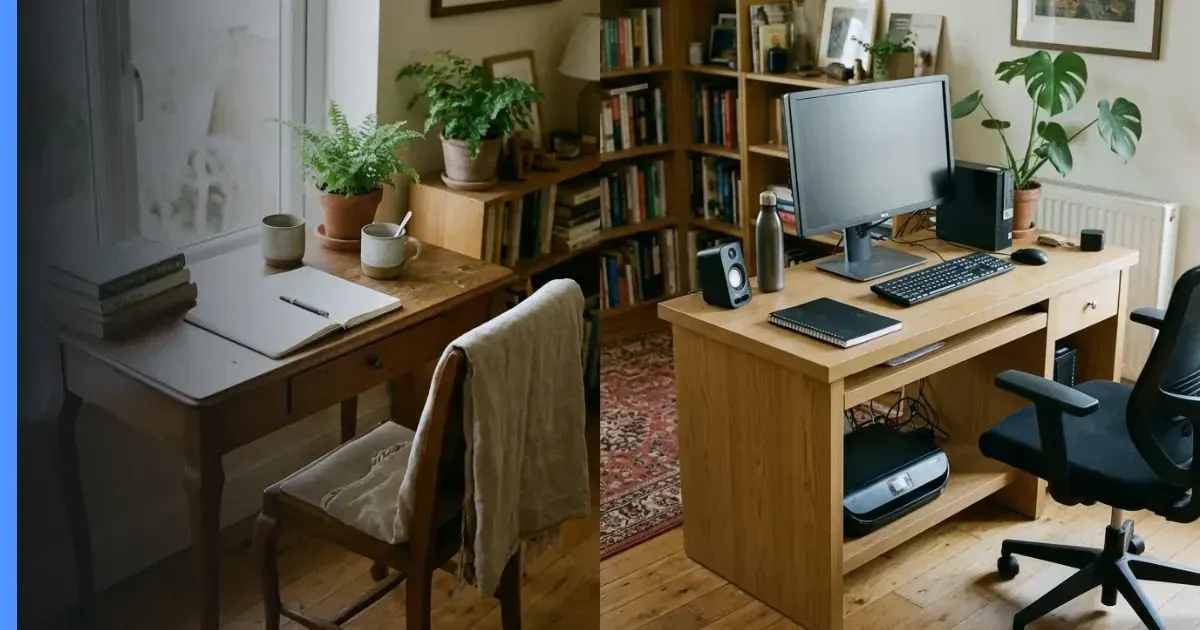
SaveA writing desk is typically shallower, lighter and built for pen-and-paper tasks, while a computer desk is deeper, incorporates cable management and provides space for a monitor, keyboard and peripheral devices. Deskstor walks through the structural differences that affect how you use each type, so you can choose one that fits your daily routine and the equipment you actually own.
Depth and working surface
Writing desks are often 40–50 cm deep, which leaves enough room for a notebook, a lamp and a few books. Computer desks run 60–80 cm from front to back because a monitor sits further from your eyes than a sheet of paper, and a keyboard and mouse need space in front of the screen. If you plan to use a laptop occasionally, a writing desk can accommodate it; if you work with a desktop tower, dual monitors or a large keyboard, the extra depth of a computer desk prevents the screen sitting too close and keeps your arms at a comfortable angle.
Clearance underneath
Many writing desks use slim legs or a trestle frame, leaving the floor clear. Computer desks sometimes include a fixed tower compartment or a crossbar for cable trays, which narrows the space where your knees go. Measure your chair height and the gap you need before committing to either style.
Storage layout
Writing desks either omit drawers entirely or provide one shallow tray for pens and stationery. A pedestal desk—a writing desk with drawers built into freestanding columns—adds filing capacity but still prioritises a clean top surface. Computer desks often include a keyboard tray that slides out, a shelf for a printer and a cupboard for a tower. These features keep devices off the main surface but add bulk to the frame.
If you already own a mobile pedestal, a writing desk without built-in drawers may suit you better. If you prefer everything integrated, a computer desk with fixed storage reduces the number of separate units in the room.
Cable management provisions
Writing desks rarely include grommets, trays or channels because they were designed before widespread use of powered devices. You can drill a grommet yourself or run cables along the back edge, but the desk will not guide them. Computer desks typically feature pre-cut grommets in the top surface, a channel along the rear rail and sometimes a metal basket underneath to hold a power strip and excess cable. These details keep cords out of sight and reduce the risk of snagging them with your feet.
Retrofitting a writing desk
Adhesive cable clips, a desk-edge sleeve or a small basket clipped to the underside can bring basic cable organisation to a writing desk. The result will not be as tidy as a computer desk's built-in system, but it avoids drilling and preserves the desk's appearance if you move it to another room later.
Materials and weight capacity
Writing desks are often made from solid wood, turned legs and a veneered top, which lends a lighter appearance but limits how much equipment the surface will support without flexing. Computer desks use laminate tops on a particleboard core, metal frames or a combination of both, which increases rigidity and lets the desk carry a heavy monitor, a tower and a printer without sagging. Check the manufacturer's stated weight limit if you plan to place more than fifteen kilograms on the surface.
Ergonomic adjustability
Most writing desks and computer desks are fixed-height, set at 72–76 cm. A sit-stand desk offers powered or manual height adjustment and is almost always sold as a computer desk because the mechanism adds cost and weight that only makes sense for long daily sessions at a screen. If you share the desk with someone much taller or shorter, or you want to alternate between sitting and standing, neither a traditional writing desk nor a static computer desk will accommodate that shift—look for an adjustable frame instead.
Footprint in a small room
A writing desk's narrower depth means it can sit against a wall in a bedroom or hallway without protruding far into the walkway. A computer desk's extra depth and side storage can make a small room feel crowded. Measure the space from the wall to the nearest furniture and subtract the desk's depth; the remaining gap should be at least 80 cm so you can pull the chair out and sit down comfortably. If the calculation leaves less, consider a wall-mounted fold-down surface or a corner unit that uses two walls. More ideas for tight spaces appear in our guide on fitting a desk in a small room.
Which type suits which tasks
A writing desk works well for handwritten correspondence, sketching, reading and occasional laptop use where you do not need multiple screens or external drives. A computer desk is built for full-time screen work, video calls, gaming or any setup that involves a tower, a monitor arm, external speakers and a tangle of USB devices. If your tasks fall between the two—mostly digital but with frequent note-taking—measure your equipment first: a deep writing desk with one drawer and space for a monitor may serve you better than a shallow computer desk crammed with features you never touch.
Choosing the right desk: six practical steps
- List every piece of equipment that will sit on or beside the desk: monitor, laptop, printer, lamp, phone dock. Measure the width and depth each item occupies.
- Add the depths together and add twenty centimetres for a notebook or a drink. That total is your minimum desk depth.
- Measure the wall or alcove where the desk will go, then subtract the desk depth. The remainder is your clearance—aim for at least eighty centimetres.
- Count the number of power cables. If you have four or more, prioritise a computer desk with grommets; fewer than four, a writing desk with adhesive clips will suffice.
- Check the desk's stated weight capacity against the combined weight of your devices. A typical monitor weighs four to seven kilograms; a tower can reach fifteen.
- Sit in your chair at the height you prefer and measure from the floor to the underside of your thigh. The desk's clearance should exceed that figure by at least five centimetres.
Comparison of core features
| Feature | Writing desk | Computer desk |
|---|---|---|
| Typical depth | 40–50 cm | 60–80 cm |
| Built-in cable management | Rare | Standard |
| Drawer configuration | None or one shallow tray | Multiple drawers, shelves or cupboards |
| Weight capacity | Lower (solid wood flexes) | Higher (laminate and metal frames) |
Mixing the two styles
Some manufacturers label a desk "writing desk" to signal a clean, minimal silhouette even when the dimensions and features match a computer desk. Look past the marketing name and compare depth, storage and cable provisions to what you need. A seventy-centimetre-deep writing desk with a single grommet is functionally a computer desk; a fifty-centimetre computer desk without drawers is closer to a writing desk. The label matters less than whether the frame supports your equipment and the surface gives you room to work without clutter.
#Computer desk #Cable management
Download PDF: Desk selection checklist PDF, 26 KB
Further reading
Frequently asked questions
Can I use a writing desk for a laptop and still have space for notes?
Yes, if the desk is at least fifty centimetres deep. A laptop typically occupies thirty to thirty-five centimetres from front to back, leaving fifteen to twenty centimetres for a notebook or a drink in front of the screen.
What cable management can I add to a writing desk that has no grommets?
Adhesive cable clips along the rear edge, a desk-edge sleeve or a small wire basket clipped underneath will guide cables without drilling. The result is less tidy than a built-in system but avoids permanent changes to the desk.
How much weight can a typical writing desk hold before the surface flexes?
Most solid-wood writing desks support ten to fifteen kilograms across the surface. A monitor and a laptop together usually weigh six to ten kilograms, which sits within that range, but adding a heavy printer or a stack of books may cause the top to sag over time. Check the manufacturer's stated limit if one is given.